


Slide Potentiometer Exercise | ACE-Lab Slide Potentiometer
This exercise shows how to read the analogue position of a slide potentiometer using Arduino input A0, scale the 10-bit reading into the 8-bit PWM range, and use that signal to vary LED brightness proportionally.
1. Learning Outcomes
After completing this exercise, learners should be able to understand how to map the analogue input reading from a slide potentiometer to a suitable range and use it to control LED brightness via PWM.
Core OutcomesRead an analogue input using Arduino A0
Measure the potentiometer position as a 10-bit digital value between 0 and 1023.
Scale the signal for PWM LED control
Convert the ADC range into the 0–255 range used to drive PWM brightness on pin 9.
2. Requirements
The exercise has the following primary requirements:
Specification1Read the slide potentiometer voltage using Arduino analogue input A0, producing a 10-bit digital value in the range 0–1023.
2Implement appropriate scaling to convert the 0–1023 ADC range to the 0–255 range required for PWM duty cycle control.
3Generate a PWM signal on pin 9 to control LED brightness proportionally to the potentiometer position.
3. Hardware Set-Up
This exercise involves connecting an LED to a PWM output pin on the Arduino and controlling its brightness using the 10-bit analogue input from the slide potentiometer.
HardwareRequired hardware
- Arduino Uno board (supported by Simulink)
- USB cable Type A to B
- Breadboard
- LED
- 220 Ohm resistor
- Slide potentiometer
- 5 × male-male breadboard wires
Assembly guidance
Connect the LED output path to PWM pin 9 and wire the slide potentiometer so that its outer pins connect to 5 V and GND while the middle pin, the wiper, connects to A0.
1Place the LED on the breadboard, connect its cathode to GND, and connect its anode through a 220 Ohm resistor to pin 9.
2Place the slide potentiometer on the breadboard, connect its outer pins to 5 V and GND, and connect its middle pin, the wiper, to A0.
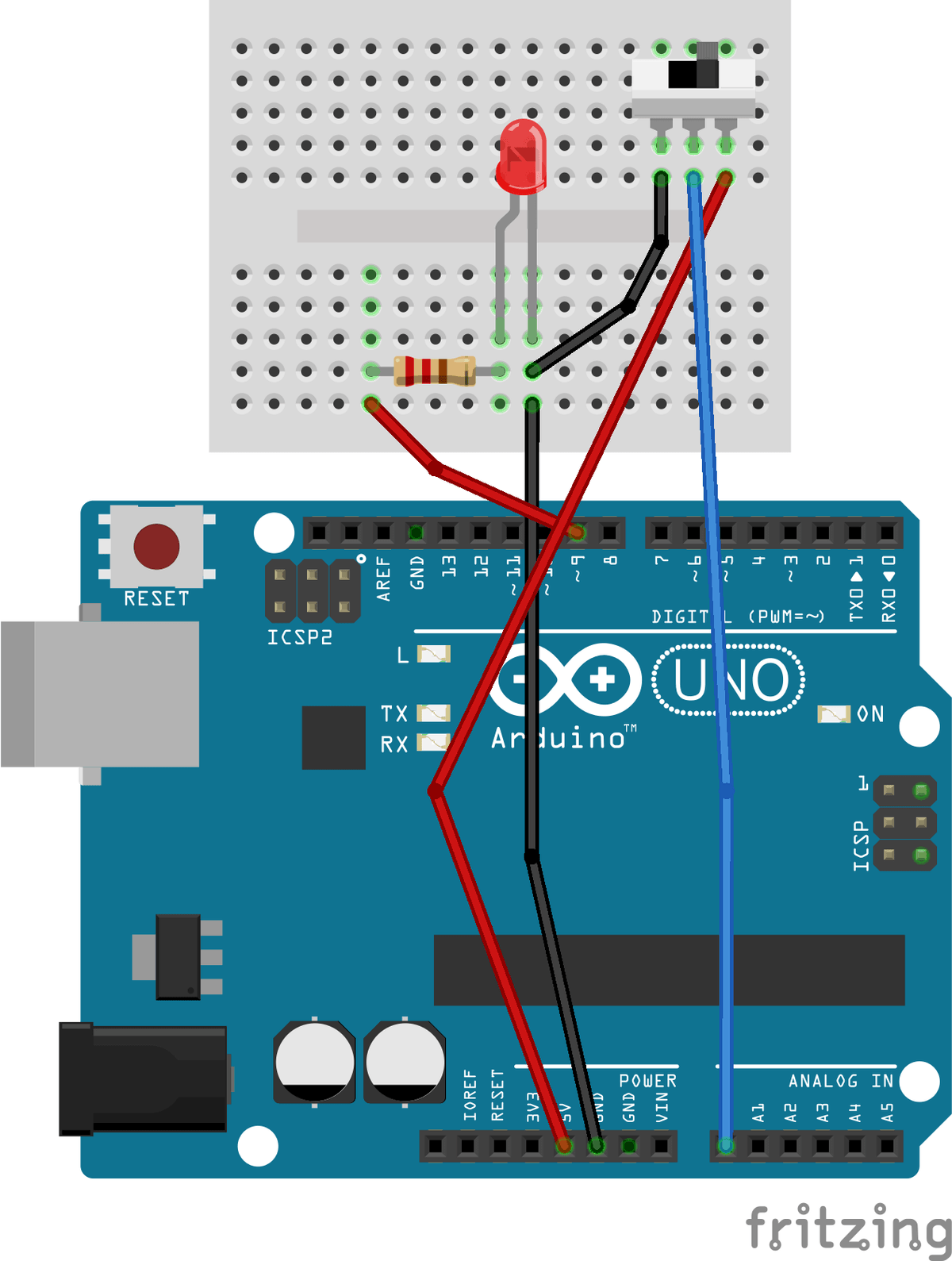
Hardware set-up for the Slide Potentiometer exercise. 4. Simulink Set-Up and Testing
In this exercise, you will develop a Simulink model to control LED brightness using PWM based on the analogue reading from a slide potentiometer.
Model BuildAdd an Analog Input block
Change the pin number to A0 and the sample time to 0.01. This reads the potentiometer voltage and outputs a value between 0 and 1023.
Insert a Gain block
Set the gain value to 255/1023. The gain block scales the ADC reading into the 0–255 range needed for PWM duty cycle control.
Connect to a PWM Output block
Connect the scaled signal to a PWM Output block and change the pin to 9. The PWM block uses the 0–255 value to generate a proportional PWM signal on the Arduino.
Add a Scope block
Connect one Scope block to the signal after the gain block. This allows the raw sensor reading to be viewed in real time and shows the scaled PWM value so the conversion can be verified.
Deploy and test
Deploy the model to the Arduino. Once uploaded, adjust the slide potentiometer position to see the PWM output change and the LED brightness vary accordingly.
Video demonstration for the Slide Potentiometer exercise. 5. Additional Exercises
After completing the main task, extend the exercise by modifying the mapping and the output behaviour.
Extension WorkExercise 1: Reverse the mapping
Modify the model so that increasing the potentiometer position decreases LED brightness.
Exercise 2: Add a deadband
Introduce a small deadband around the mid-position so that small movements do not change brightness.
Exercise 3: Add a second LED
Add a second LED that activates when the potentiometer exceeds 75% of its range.
6. Concluding Remarks
SummaryThis exercise demonstrates analogue signal acquisition, scaling, and PWM-based actuator control using Simulink and Arduino hardware.
You have implemented a complete signal-conditioning chain comprising acquisition, scaling, actuation, and verification.
